Built by two people who still serve at their churches on Sundays
Ministry is hard enough.Running the church shouldn't be.
Ezra helps the pastor of a small church run the week. E.Z., the assistant inside it, tells you what needs attention, gets Sunday ready ahead of time, and keeps follow-ups moving. You approve each step. You do not need another church system to use it.
For pastors of small churches · No credit card required · Guided setup with E.Z.
Scroll to see a week with E.Z.
- Know what needs attention this week
- Prepare for Sunday with less chasing
- Keep follow-ups from falling through the cracks
- Review what E.Z. prepares before it acts
A week with E.Z.
You open Ezra, and E.Z. already knows where the week stands
No dashboard to decode and nothing to remember to ask. E.Z. opens with the few things that need you this week, taken from your own church's records. Pick one and it works on it with you, or type whatever is on your mind.

Early in the week
Sunday's gaps, found while there is still time to ask
- What E.Z. noticed
- Three positions for Sunday still have nobody in them.
- What it prepared
- An offer to draft who could cover, from the people who are available and eligible.
- What you decide
- Work on it now, open the schedule yourself, or ask to be reminded tomorrow.
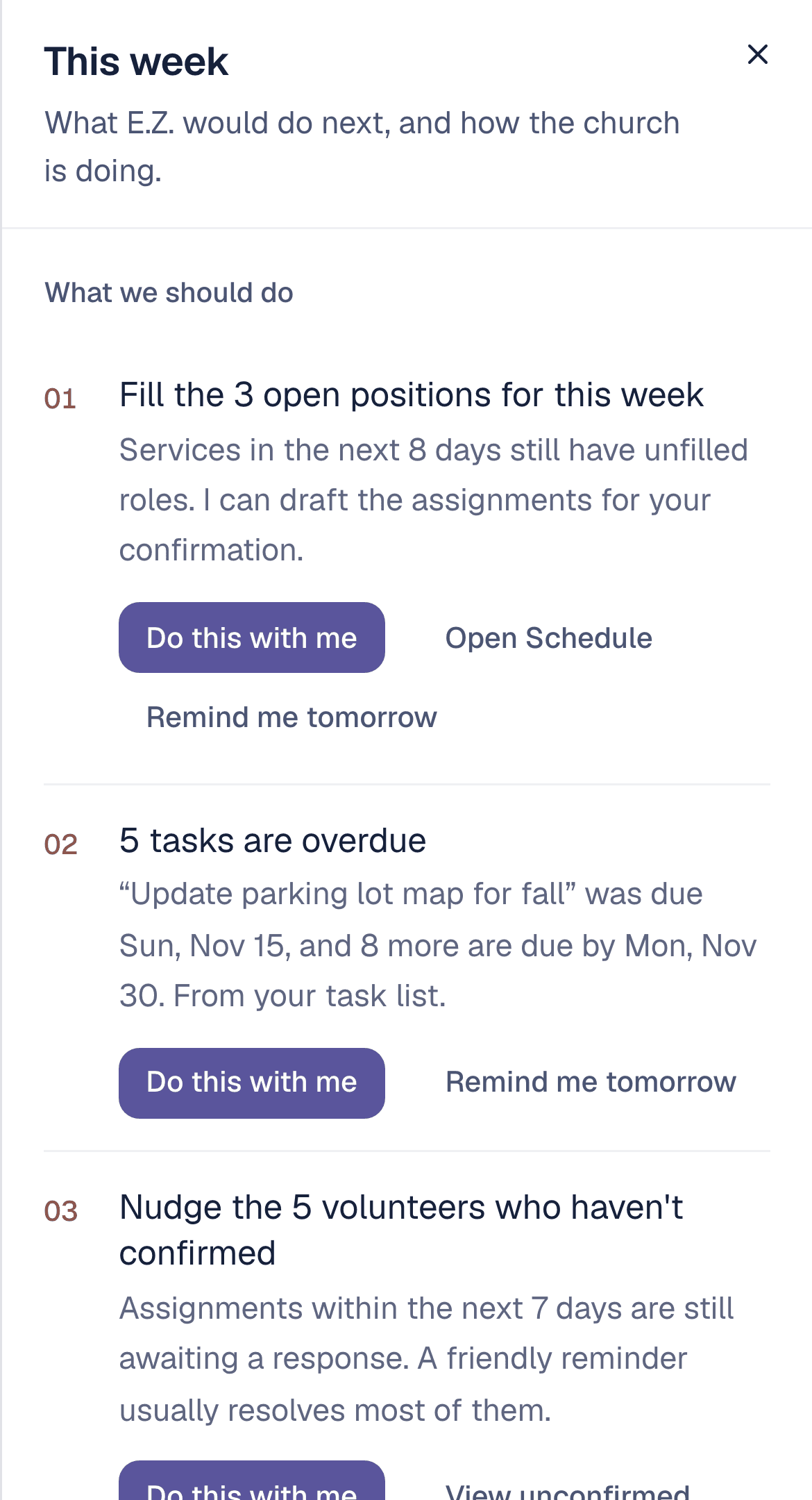
ezraos.co/aiSample data: Grace Community Church (fictional) Midweek morning
A note that something is ready
- What E.Z. noticed
- It is midweek and Sunday is still short.
- What it prepared
- A draft of who could cover each position, and a note in Ezra saying so. The note stays inside Ezra; nobody is emailed or texted.
- What you decide
- Open it when you have a minute. Nothing has changed yet.
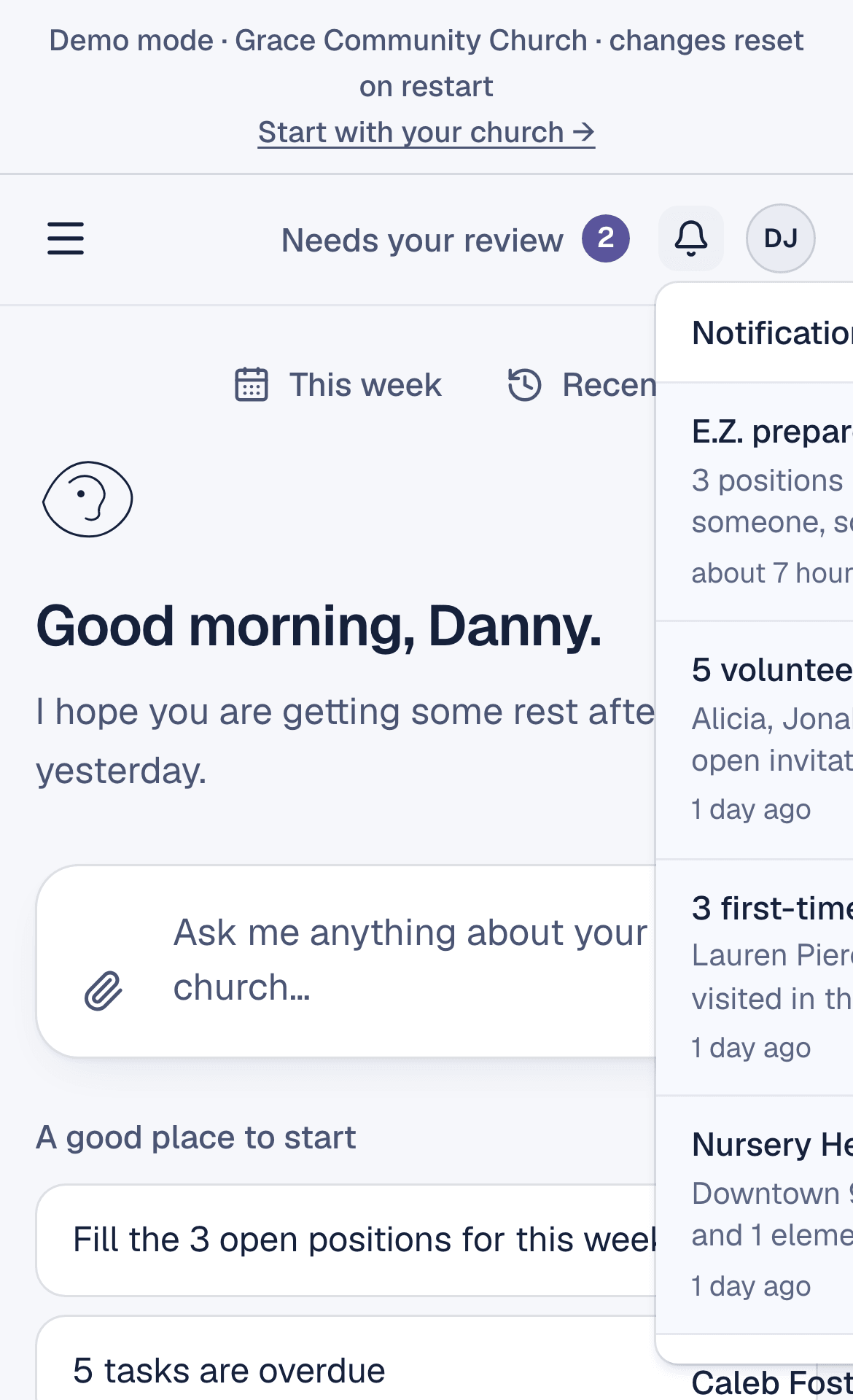
ezraos.co/aiSample data: Grace Community Church (fictional) When you open it
The draft, waiting in “Needs your review”
- What E.Z. noticed
- Who is free, who is trained for the role, and who has been serving too often.
- What it prepared
- Three named people, each with a role and a service. The card says what approving does and who would hear about it.
- What you decide
- Approve the assignments, change a person, or decline.
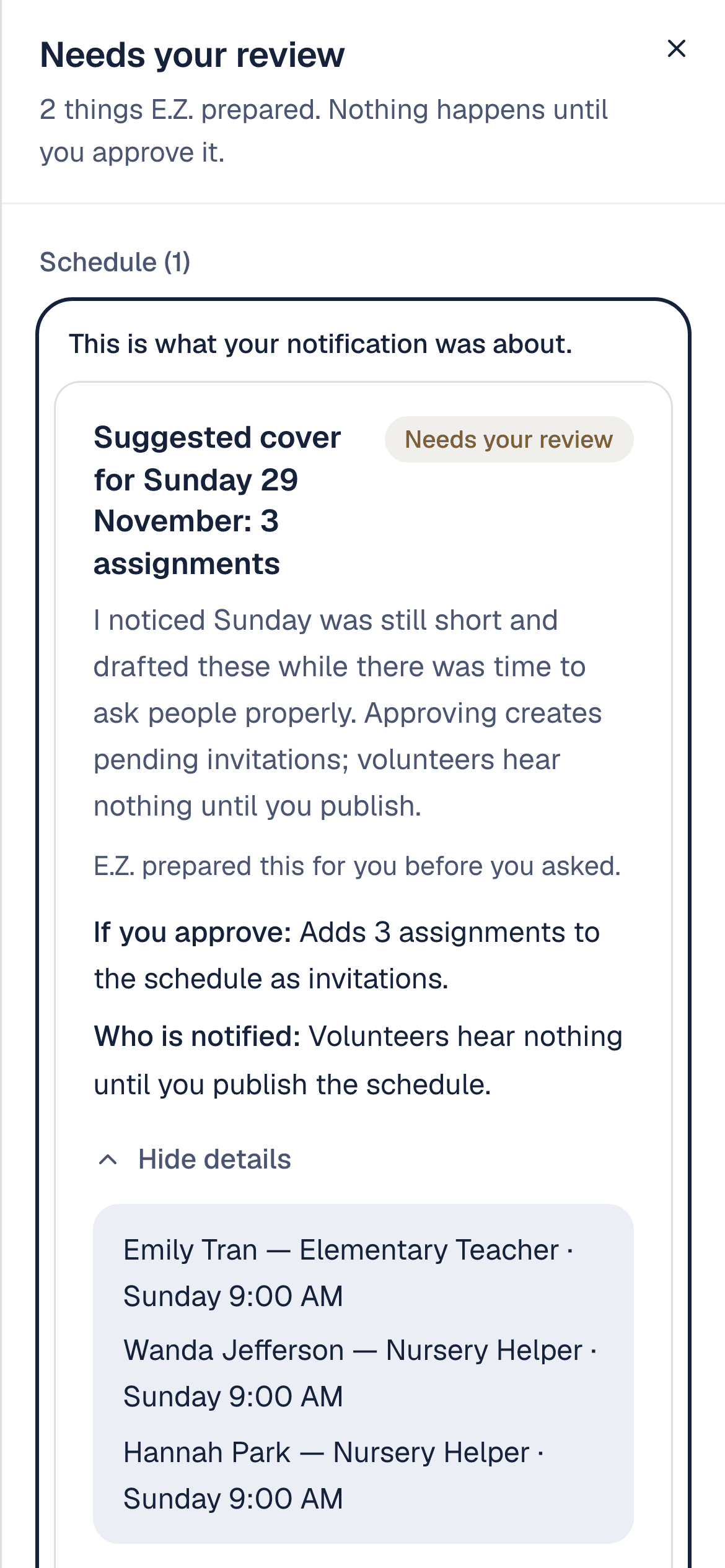
ezraos.co/aiSample data: Grace Community Church (fictional) After you decide
You approve, and Ezra shows what happened
- What E.Z. noticed
- Your approval. Until then the draft changed nothing.
- What it prepared
- Three invitations on the schedule, marked pending. Volunteers still hear nothing until you publish.
- What you decide
- Publish the schedule when you are ready to ask them.
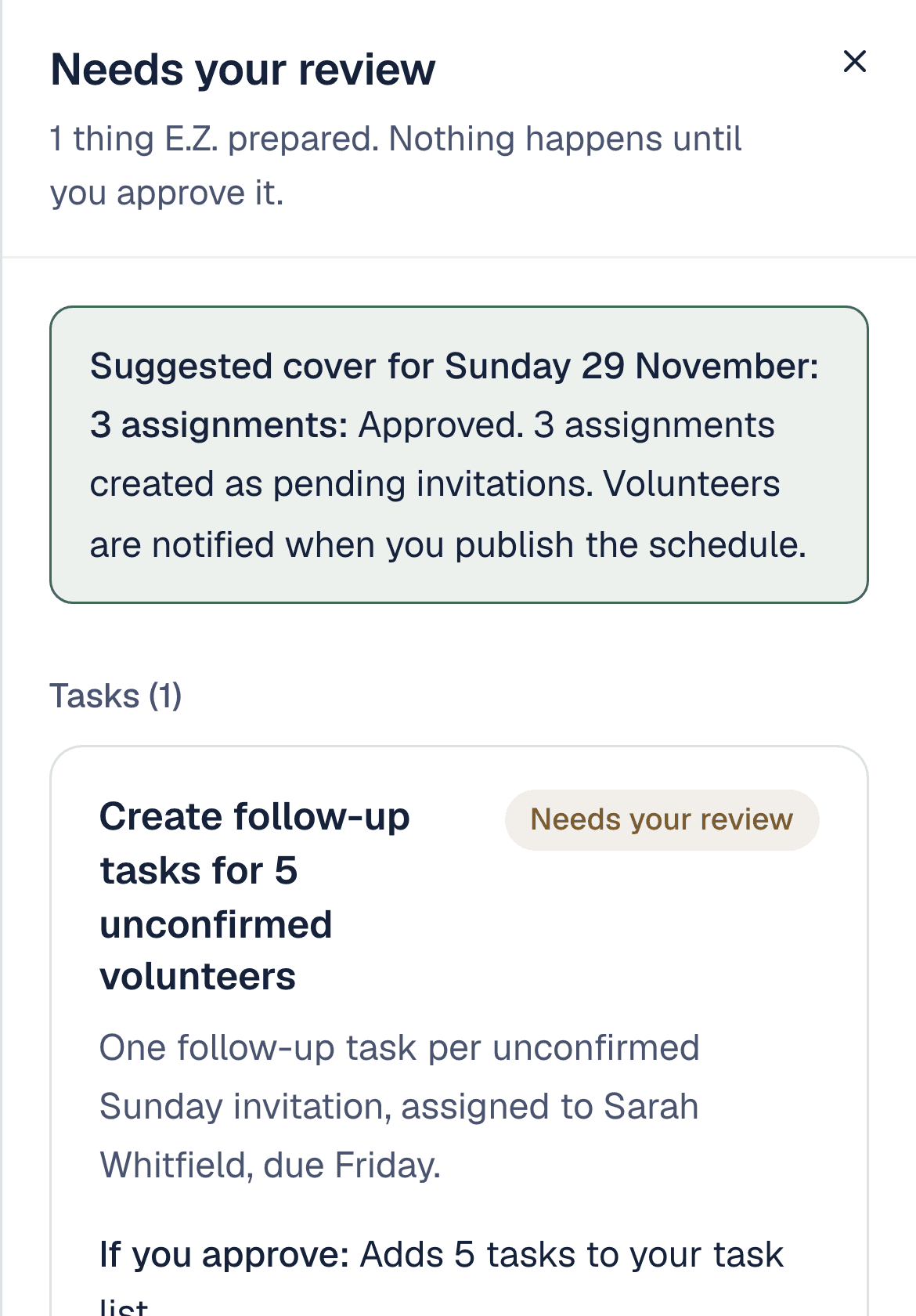
ezraos.co/aiSample data: Grace Community Church (fictional)


That is the whole pattern, for a Sunday roster, a guest who has not heard back, or a reminder to volunteers: E.Z. notices, E.Z. prepares, and nothing happens until you approve it. You can edit every draft first.
The real product isn't software. It's peace of mind.
Everything in Ezra exists to answer one of the questions that keeps church leaders awake on Saturday night.
“Is anything slipping?”
Not anymore. Every guest, every open role, every renewal has an owner and a deadline. When something needs attention, it finds you, instead of waiting to be discovered.
“What actually needs me today?”
One prioritized answer, in plain language, with the next step attached. Not another dashboard to decode. Clarity about this week, every week.
“When do I get to just pastor?”
The rosters, guest follow-ups, and weekly priorities live in one place that keeps them moving. Your energy goes to the hospital visit, the hard conversation, the sermon. The things only you can do.
01
Scheduling
Retire the Saturday night scramble
You know the feeling: three empty spots, a group text nobody is answering, and a service in twelve hours. Ezra sees every gap days ahead, suggests the right people with the reasons spelled out, and collects the confirmations, so Sunday is settled by Thursday and Saturday night belongs to your family again.
- Suggestions with reasons, never a black box
- Expired background checks blocked before they reach Sunday
- Publish once; volunteers confirm from a text or email link, no account needed

02
Volunteer care
Catch burnout before it becomes a resignation
Your most faithful people are the ones most at risk. They won't tell you they're tired; they'll keep saying yes until one day they quietly disappear. Ezra watches the serving load (six straight Sundays, rising declines, sudden cancellations) and tells you while a thank-you and a week off still fix it.
- Health signals built from serving patterns only, never judgments about people
- Burnout watch list on every dashboard
- Background-check and training compliance tracked per role

03
Guest follow-up
Someone gathered the courage to visit. Don't let silence answer them.
Walking into a new church takes more courage than most of us remember. The moment a guest is added, Ezra starts the follow-up plan: a thank-you message to send, a personal call, a next-steps invitation, each a task with an owner and a date. Messages go out only after you confirm them. And every Monday morning, you get an email naming anyone still waiting to hear from you.
- Follow-up sequence starts automatically for every guest
- Drafted personal messages you edit and approve before anything sends
- Monday briefing: who's still waiting, by name

Getting started
You don't need another system to start
Ezra runs a small church's week by itself: people, volunteers, Sunday schedules, guests, tasks and messages. If you already use Planning Center, connecting it is optional, and you choose how much of it to keep.
Most small churches
Start directly in Ezra
No other system, no import, no long form. E.Z. asks what would help most right now and a few short questions, then shows you a small plan to check. What you save are real tasks, people and follow-ups in Ezra.
Optional
Bring your information over, then work in Ezra
Attach the spreadsheet you already keep, or connect Planning Center once and choose which people, teams and services come across. You review the list before anything is added, and nothing in Planning Center is changed.
Optional
Keep using Planning Center alongside Ezra
If your teams already live in Planning Center, keep them there. You choose which parts it keeps driving (your directory, your teams, your services), and Ezra follows those parts instead of asking you to enter them twice.
What Ezra is not: accounting software, an online giving processor, or a child check-in system. It can keep your weekly giving totals if you want them beside attendance, and Planning Center is the only system it connects to today. More in the FAQ.
Why we're called Ezra
Ezra doesn't replace pastors. Ezra carries the operational burden so pastors can carry out their calling.
We're named for the scribe who reorganized God's people after the exile: priests in their divisions, Levites in their courses, so that worship would continue faithfully week after week. That is still the job. Where there is chaos, order. Where there is confusion, clarity. Where there is administrative burden, room to shepherd people.
Security
Built for the trust your congregation places in you
Churches handle sensitive information about real people. Ezra treats that as a design constraint, not an afterthought.
Complete data isolation
Every church’s data is separated with row-level security, enforced by the database itself.
Role-based permissions
Access scoped by role, down to sensitive pastoral notes and background-check status.
Approval-first AI
The AI proposes; a leader approves. Every action lands in a complete audit trail.
Consent-aware messaging
Email and SMS respect each person’s communication preferences automatically.
Hand off the burden. Keep the calling.
E.Z. starts with one question: what would help most right now? Pick an answer or say it in your own words, check what E.Z. understood, and save it. Nothing is sent or changed until you approve it. Two free Sundays to feel the difference.